Telemetry dashboards
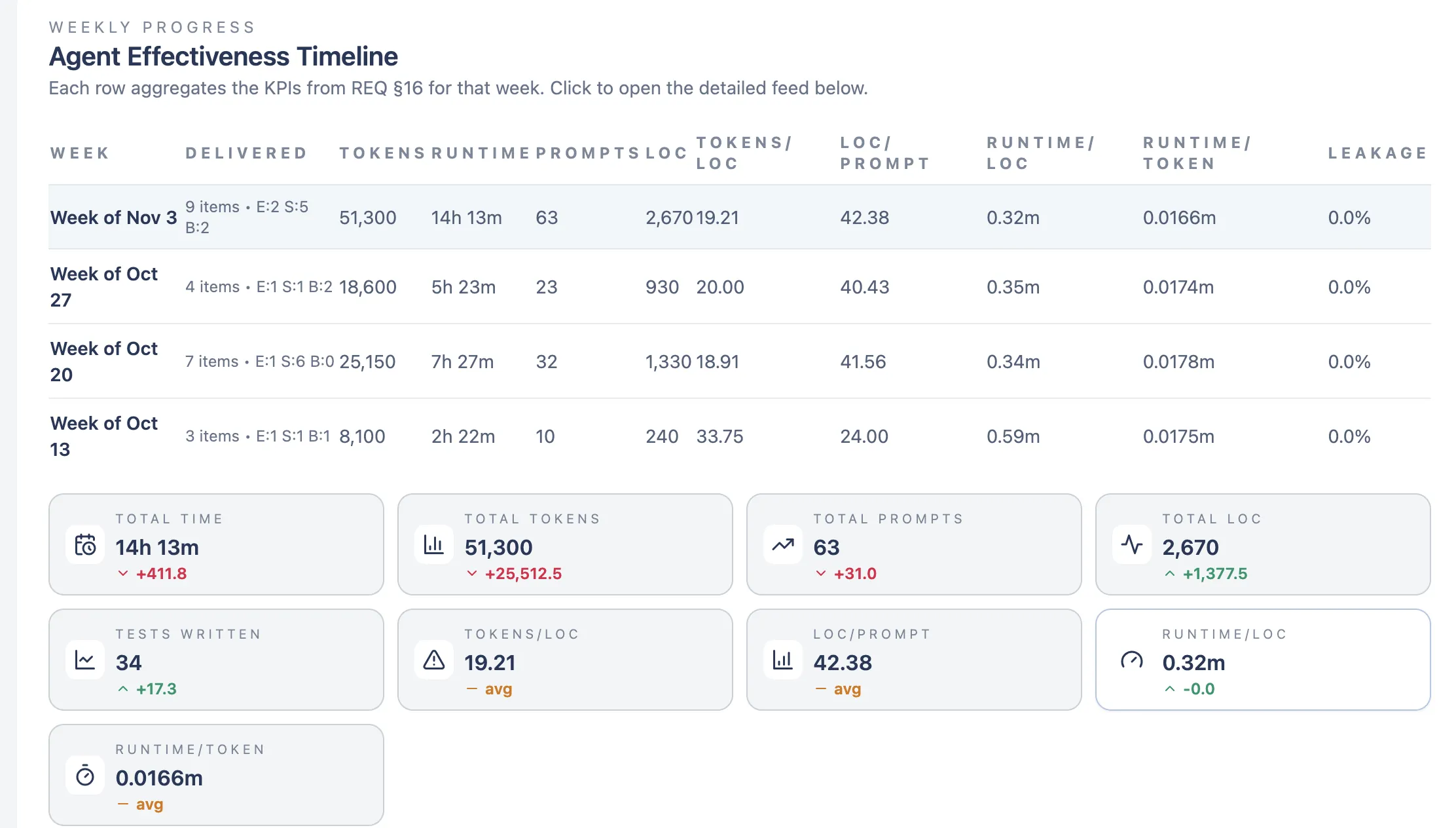
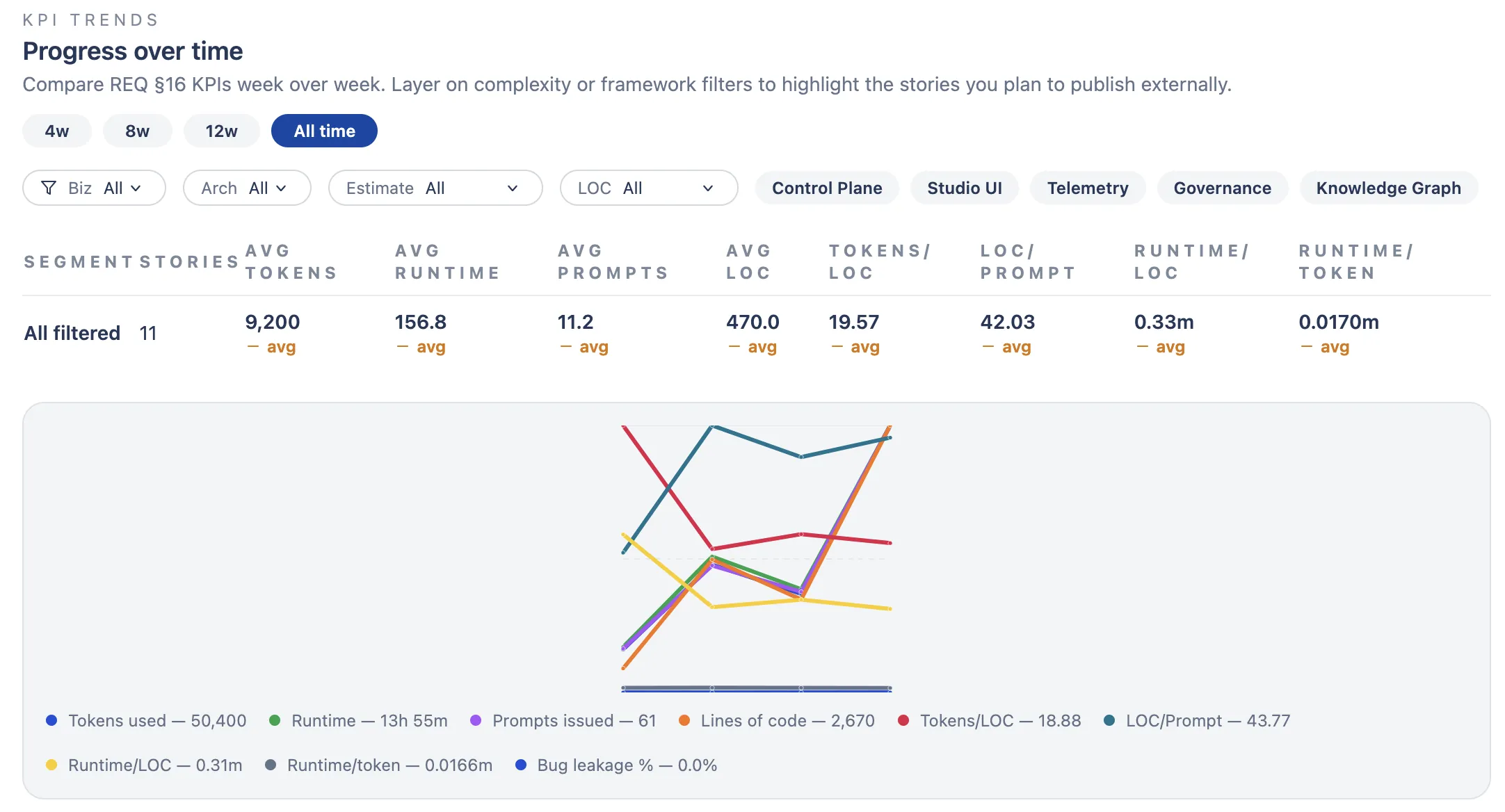
Every agent run gets tracked automatically. These are the dashboards I check weekly to see if a config change actually moved the numbers.
MCP Server for Agentic Development
An MCP server that turns Claude Code into a coordinated team of agents. Define workflows, assign agents to each phase, track what they produce. Connects via Model Context Protocol so any MCP-compatible client can use it.
Open source · Self-hosted · MCP native · Docker
AI Studio sits between you and Claude Code. It connects via MCP (Model Context Protocol) and gives you tools to manage how features get built.
The idea is simple: instead of dumping a big task into one Claude session and hoping for the best, you break it into phases. Each phase gets its own agent with specific instructions and access to the artifacts it needs. A PM agent analyzes requirements. An Explorer investigates the codebase. An Architect writes the design doc. An Implementer writes the code. You orchestrate the whole thing with a few MCP commands, and the system records what each agent did.
It tracks 380+ stories across 27 epics so far, with cost calculation, token metrics, and structured summaries for every agent run. You can set approval gates where you review agent output before it continues, add breakpoints for debugging, or run agents on a separate machine.
Create, update, and track stories and epics through MCP tools. Status tracking from backlog to done.
Define a sequence of states. Each one spawns a specialized agent: PM, Explorer, Architect, Designer, or Implementer.
You stay in control. get_current_step tells you what to do, advance_step moves forward, repeat_step retries with feedback.
Every agent run gets recorded: tokens, cost, duration, files changed, commits, lines of code. No manual setup.
Agents write versioned artifacts like architecture docs and design specs. File-based pattern with guaranteed delivery.
Pause any workflow state for human review. Approve, reject with feedback, or edit artifacts before the next agent runs.
Run agents on your laptop or a separate server. If the remote goes offline, the system can pause, skip, or fail gracefully.
Watch agents work in real time. Transcript lines stream over WebSocket as code gets written.
25 core tools loaded for every agent. Another 40+ discoverable via search_tools.
create_story Create a new story with title, type, and priority
get_story Get story details by ID or key (ST-123)
update_story Update status, description, or assignment
list_stories Search and filter stories across projects
list_teams List available workflow teams
start_team_run Start a workflow run for a story
get_current_step Get instructions for the current phase
advance_step Move to the next phase or state
repeat_step Retry current state with feedback
get_runner_status Check workflow execution status
create_artifact Create or update a versioned artifact
get_artifact Retrieve artifact by ID or key
list_artifacts List artifacts for a story or workflow run
get_component_context Get component instructions and artifact access
search_tools Find tools by keyword or category
Call start_team_run with a story ID and team. The system creates a WorkflowRun and sets up state tracking.
Call get_current_step. It tells you what to do: pre-execution setup, which agent to spawn, what to check afterward.
The step gives you the agent config: subagent type, model, and a prompt with all the context baked in. You spawn it via Claude Code's Task tool. The agent does the work, not you.
Call advance_step with the agent's output. The system records metrics, generates a summary, and moves on. Keep going until it's done.
Every agent run gets tracked automatically. These are the dashboards I check weekly to see if a config change actually moved the numbers.
NestJS with Prisma ORM. PostgreSQL with pgvector for semantic search. WebSocket gateway for streaming. REST API with JWT auth.
React with Vite and TailwindCSS. Workflow monitoring, story board, artifact viewer.
11 tool categories, 60+ tools total. 25 are loaded by default for every agent. The rest are discoverable via search_tools.
Five component types: PM, Explorer, Architect, Designer, Implementer. Each has its own instructions and artifact access rules.
git clone https://github.com/pawelgawliczek/AIStudio.git

cd AIStudio

cp .env.example .env

docker compose up -d
Then add the MCP server to your Claude Code config. See the README for details.
Built by Pawel Gawliczek